
Technical documentation
Specifications, installation and alignment for the KORUZA Pro wireless optical communication system. This guide assumes a basic understanding of how to install and operate networking equipment.
Models: 1 Gb/s · 10 Gb/s
KORUZA Pro overview
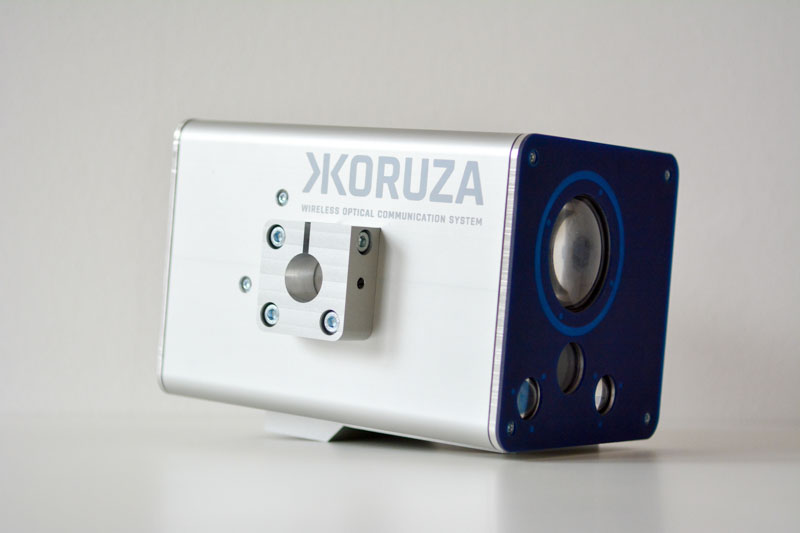
KORUZA Pro is a wireless optical link for dense urban networks: two units, a clear line of sight, and an optical network is up in an afternoon with no trench and no spectrum. It needs little maintenance, and it actively protects the link by re-aligning itself as the mounting moves.
Data is securely transmitted point-to-point over a collimated beam of light at 1 Gb/s or 10 Gb/s throughput, at distances up to 150 m, using an eye-safe infrared beam that is invisible to the human eye.
KORUZA Pro IoT provides wireless optical connectivity for sensors and device-to-device communication in industrial applications. A low-speed 1–10 Mb/s design carries the majority of sensor measurements in real time — from unit-to-unit management traffic, to a stand-alone sensor link between a stationary base station and a system moving along a straight linear rail, such as a crane or a roller coaster. The multi-protocol interface extends standard I²C, SPI or UART alongside a normal Ethernet setup.
Application examples
KORUZA Pro is used to advantage for:
- Point-to-point bridging
- Increasing the capacity of existing wired and wireless networks
- Expanding the reach of FTTH
- Last-mile mesh networking
- Cell base-station uplinking
- Simplified campus connectivity
- Rapid response networking
How the link works
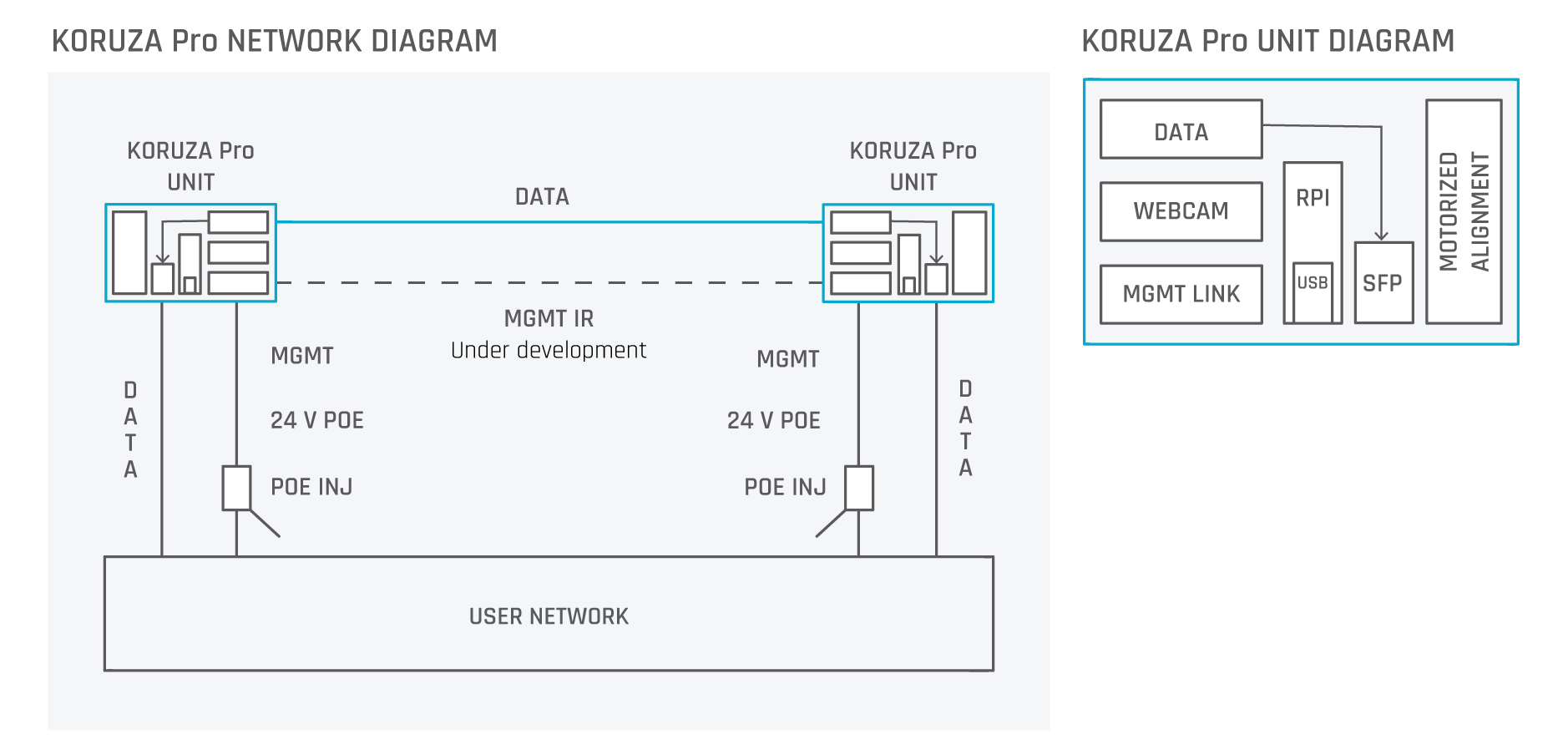
Network traffic is converted into pulses of invisible light representing ones and zeros. A transmitter projects a narrow beam towards the other unit, where a plano-convex lens collects the light onto a photodiode and converts it back to an electrical signal. Each unit both transmits and receives, so communication is bi-directional.

Specifications
Published figures for the two shipping KORUZA Pro configurations. The link budget calculator on this site is driven by exactly these numbers.
| Parameter | Bridge 1 Gbps | Bridge 10 Gbps |
|---|---|---|
| Electrical | ||
| Network port | SFP cage (data), 100 Mb/s Ethernet (management) | |
| Power supply | 24 V (12–30 V) 0.5 A, PoE 802.3af mode B | |
| Average consumption | 6 W | |
| Mechanical | ||
| Outdoor enclosure | Anodized aluminium | |
| Mounting | Vertical or horizontal pole up to 60 mm diameter | |
| Weight | Approx. 2 kg | |
| Dimensions | 180 × 120 × 120 mm | |
| Manual alignment accuracy | 1 mrad | |
| Motorised alignment accuracy | 0.003 mrad | |
| Optical | ||
| Source and detector | SFP | SFP+ |
| Wavelength | 1330 / 1550 nm | 1270 / 1310 nm |
| Transmit power | 0.0 dBm | 0.5 dBm |
| Receiver sensitivity | -23.0 dBm | -15.0 dBm |
| Optical budget | 23.0 dB | 15.5 dB |
| Bandwidth | 1 Gbps | 10 Gbps |
| Beam divergence | 0.05 mrad | 0.05 mrad |
| Aperture | 50 mm NBK7 plano-convex lens | 50 mm NBK7 plano-convex lens |
| Receiver field of view | 10 mrad | 10 mrad |
| Laser class | Class 1M — eye safe | |
| Control and routing | ||
| Routing platform | Not integrated | |
| Management interface | HTTP, SNMP and custom protocols, on a built-in Raspberry Pi Compute Module running Linux | |
| Auto-tracking | Yes, requires the management link | |
| Data processing | None via the SFP port — a Layer 1 system | |
| Annual optical link availability | 99% | |
| Environmental | ||
| Operating temperature | −40 °C … 60 °C | |
| Outdoor rating | IP65 | |
| Range | 20–150 m | |
Attenuation at 100 m
Published attenuation figures across visibility conditions.
| Condition | Visibility | Attenuation @ 100 m |
|---|---|---|
| Clear day | 10 km+ | 0 dB |
| Moderate fog | 500 m | 1 dB |
| Dense fog | 100 m | 4 dB |
| Very dense fog | 50 m | 10 dB |
Installation guide
Before you start
- Confirm a clear line of sight between the two units — check for trees, planned construction and any other obstruction.
- Confirm the two locations are no less than 20 m and no more than 150 m apart.
- Confirm a stable, vibration-free mounting location.
- Confirm all required cable routes are available.
- Choose a location that protects operational integrity — near a roof edge or similar to avoid interrupting the beam, and weather-protected wherever possible.
- Ensure safety compliance: appropriate warning signs must be placed and posted at the equipment site or access entry. See the safety section below.
- Ensure compliance with applicable laws, regulations, codes (electrical, building, fire) and agreements.
Installation at a glance
- Install the mount.
- Power up the unit.
- Connect a smartphone or computer to the unit's WiFi.
- Coarsely aim the units and tighten the screws.
- Open the management interface and click on the image where the opposite unit appears.
- The management IR link is established.
- Use the arrow keys to align the units.
What is in the box
Included
- KORUZA Pro — 2 units
- Mount — 2 pieces
- PoE power supply
- PoE power cable (country specific)
- USB WiFi module
Also needed
- SFP module (one matched pair)
- For wall mounting: 4 × 13 mm screws and 4 × 13 mm wall plugs
Tools required
- 13 mm wrench
- 2.5 mm hex key
- 4 mm hex key
Prepare the units
- Connect the USB WiFi module to the KORUZA Pro unit's USB port.
- Insert the SFP module into the unit's SFP data port. The unit is now ready to install.
Mounting the unit
A unit can be mounted on a vertical pole, a horizontal pole or a wall. The preferred pole diameter is 40 mm, though the bracket fits any standard pole between 30 mm and 50 mm. Use a short pole, no longer than 500 mm, unless it is firmly mounted at both ends and securely bolted to a fixed structure — otherwise operation becomes unstable in high winds and bad weather. If in doubt about your location, contact tech@irnas.eu.
On a vertical pole
- Insert the U-bolt into the pole clamp and dish bracket.
- Secure each end of the U-bolt with a washer and a nut.
- Tighten until the spring washer is well compressed.
On a horizontal pole
- Remove the jaws.
- Reinstall the jaws vertically, rotated by 90 degrees.
- Insert the U-bolt into the pole clamp and dish bracket.
- Secure each end of the U-bolt with a washer and a nut.
- Tighten until the spring washer is well compressed.
On a wall
- Remove the jaws from the mounting bracket.
- Attach the bracket to the wall using 4 × 13 mm screws and 4 × 13 mm wall plugs.
Fit and connect
- Place the unit on the mount with its opening facing you.
- Connect the management and power cable.
- Connect the data cable or fibre to the SFP module.
- Route the cables through the gasket.
- Confirm the unit is powered by checking that the LEDs at the management and data ports are lit.
- Close the lid.
- Connect your computer or smartphone to the KORUZA WiFi network. The default password is koruzakoruza.
- Open 172.22.0.1. The default login is username root, password raspberry.
- Watch the webcam image and point the unit towards the other one until you are within roughly 1 m — you need to see the opposite unit on screen.
- Note the IP address of the unit shown in the web interface. You will need it during alignment.
- Tighten the two screws at the back of the mount, then the upper screw. Repeat the whole process on the other unit.
Alignment and link establishment
Open the management interface for both units — you will need the IP address you noted for each. It helps to have the two interfaces side by side. Each shows a camera view and live link data. The RX Power field is the main guide during alignment. Note that moving a unit has a greater effect on the received power at the opposite end than on its own.
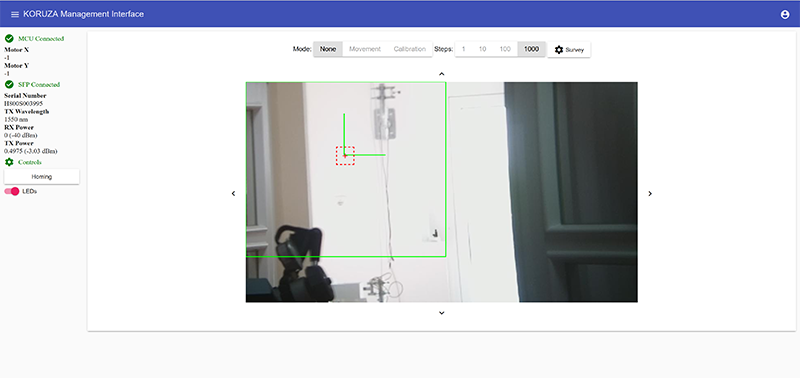
- If aligning in low visibility, the unit LEDs can be switched on and off with the LEDs button; they are on by default. Above the camera view, set the movement mode to None.
- Use the arrow keys near the edges of the camera view to align the units. First bring the centre of the red square onto the centre of the opposite unit to establish the link. Choose the movement magnitude with the Steps option — 1000 is usually right for coarse alignment. A colour trace appears as the unit moves, indicating signal strength (red is optimal, yellow is weak); toggle or reset it under Survey options.
- The link is established once RX Power is greater than −25 dBm on both units.
- Now use the arrow keys to maximise received power on both units.
A method that works
A reliable way to find the optimum:
- Move unit 1 left and right, stopping where the most signal is received at unit 2. Start with Steps 100.
- With that position found, move the same unit up and down, again stopping at maximum received signal at unit 2.
- Repeat both steps on unit 2, now watching the signal received at unit 1.
Repeat the cycle, reducing the step magnitude as you go. Steps 100 is usually enough for links up to 50 m; Steps 10 gives sufficient accuracy on longer links.
After-installation checklist
- All mounted parts are tight — poles, screws, nuts.
- All cabling is protected from strong winds; retighten if necessary.
- All connectors and seals are tight.
- Alignment is correct.
- Signal strength is confirmed at both ends.
- No visible damage occurred during installation.
KORUZA Pro controller
The unit runs a built-in Linux system on a Raspberry Pi Compute Module, exposing the camera view, live link telemetry and motor control over HTTP, with SNMP and custom protocols available. Full controller documentation is in preparation.
Troubleshooting
Troubleshooting flowcharts covering failures caused by the system, attached network components or the environment are in preparation. In the meantime, contact tech@irnas.eu with the RX Power readings from both ends and we will work through it with you.
Maintenance
General maintenance is minimal and depends on the operating environment. In dustier settings such as cities and industrial sites, keeping the front lenses clean matters — a dirty front compromises link performance. Check the units annually, or whenever the signal degrades noticeably.
Wipe the front lenses with a clean, damp, lint-free cloth at regular intervals. Once a year is enough in clean environments; where dust or sea-salt deposits are likely, do it more often.
Do not attempt to open the housing — there are no user-serviceable parts inside. The KORUZA monitoring platform reports link performance automatically and notifies you when a unit needs attention. For assistance, contact tech@irnas.eu.
Safety
The equipment is safe when operated in accordance with this guide. Laser radiation is emitted only from the apertures on the front of the units; it cannot pass through any other opening. The equipment is in the process of testing to confirm compliance with:
- IEC 60825-1:2014 — laser safety
- IEC 60950-1:2005 +A1:2009 +A2:2013 — electrical safety
- EN 55024:2010 and EN 55022:2010 Class 1M — emissions
- RoHS Directive 2002/95/EC — restriction of hazardous substances
- WEEE Directive 2002/96/EC — collection and recycling of electronic equipment
- Directive 2006/25/EC — artificial optical radiation
Installation locations
Unrestricted locations are areas normally accessible to the public — unrestricted rooftop areas, public ground level, open areas of offices and industrial premises. To install here, the link head must be 3 m or more above the surface, or within 1 m of the edge of the area. A warning sticker must be applied to the unit: "Do not use binoculars, telescopes or other optical aids to view the FSO link heads."
Restricted locations are areas normally inaccessible to the general public through administrative or engineering controls, but reachable by authorised personnel who may not have laser safety training — maintenance staff, window cleaners. There are no special requirements here.
Controlled locations are areas made inaccessible except to authorised personnel with laser safety training — tower-mounted terminals, fenced rooftops, locked rooms with strictly controlled access. There are no special requirements here.
Warning: Do not look directly into the laser aperture from a short distance. Never use any optical instrument to view the laser beam.
Caution: Use of controls or adjustments, or performance of procedures other than those specified here, may result in hazardous radiation exposure.
Proper disposal
Dispose of this product separately from household waste. It is your responsibility to dispose of this and other electrical and electronic equipment through collection facilities appointed by the government or local authorities. Improper disposal may contaminate the environment and present a health risk from the hazardous substances contained within. Correct disposal and recycling helps prevent harm to the environment and human health and lessens the demand on natural resources. Contact us if you need more information.
Licence and warranty
Licence
KORUZA Pro is licensed under open source licences:
- Hardware, including documentation, under the CERN OHL v.1.2.
- Firmware and software originating from the project under the GNU General Public License v3.
- Open data generated by KORUZA Pro under CC0.
- Websites and additional documentation under the Creative Commons Attribution-ShareAlike 4.0 licence.
What this means is that you can use the hardware, firmware, software and documentation without paying a royalty, knowing you will be able to use your version forever. You are also free to make changes, but if you share those changes you have to do so on the same conditions that you enjoy.
KORUZA, KORUZA Pro and IRNAS are names and marks of IRNAS Technologies d.o.o. You may use these names and terms only to attribute the appropriate entity as required by the open licence referred to above. You may not use them in any other way, and in particular you may not use them to imply endorsement or authorisation of any hardware that you design, make or sell.
Warranty disclaimer
Read the full disclaimer of warranties and limitation of liability for engineering prototypes
Description
IRNAS Technologies d.o.o. (the “Seller”) is the Seller of custom manufactured engineering prototypes, including the KORUZA Pro Technology Preview Engineering Prototype (the “Prototype”). The receiver/purchaser (the “Purchaser”) has ordered the Prototype from the Seller. By purchasing the Prototype, the Purchaser agrees to be bound by the terms of this Waiver.
In case the Prototype is sold to the Purchaser in a set of components, it requires assembly, calibration and modification of the Prototype by the Purchaser to perform its functions. By purchasing, receiving or using the Prototype the Purchaser accepts the entire risk as to the use, quality, and performance of the Prototype. This disclaimer of warranty and limitation of liability is an essential part of the contract of sale and of any transfer of ownership.
The Purchaser agrees that should it use any open source software provided by the Seller under an Open Source License then the provisions of license including any disclaimers shall apply to its use of the software and no liability in respect of use of the software shall arise from Purchaser’s purchase of the Prototype.
Disclaimer of warranties
Unless otherwise separately undertaken by the Seller, to the extent possible, the Seller offers the Prototype as-is and as-available, and makes no representations or warranties of any kind concerning the Prototype, whether express, implied, statutory, or other. This includes, without limitation, warranties of title, merchantability, fitness for a particular purpose, non-infringement, absence of latent or other defects, accuracy, or the presence or absence of errors, whether or not known or discoverable. In addition, the Seller does not warrant that the operation of the Prototype will be error-free or that operation will be uninterrupted.
In response to a request from the Purchaser the Seller in its unfettered discretion may chose to replace a part or parts or refund some or all of the purchase price paid for a Prototype. There is no obligation on the Seller to do so. The Purchaser agrees that replacement of a part or offer of a partial or complete refund in no way establishes liability on the part of the Seller.
The Seller does warrant that the Prototypes will arrive undamaged and made in accordance to the Prototype specifications when received by Purchaser. In the event that the Prototypes are damaged upon receipt, Purchaser shall notify the Seller and ship the damaged Prototypes back to the Seller within ninety days of initial delivery to the Purchaser. The Purchaser shall bear the costs of shipping the Prototypes back to the Seller.
When the Seller receives a returned Prototype within ninety days of the initial delivery to the Purchaser the Seller may in its sole unfettered discretion, send either a replacement Prototype or a refund. This Warranty shall be effective for returns received within ninety days of the initial delivery of the Prototype. The Seller will not accept a return for any other reason.
Where disclaimers of warranties are not allowed in full or in part, this disclaimer may not apply to all Purchasers.
Release of liability and limitation of liability
Purchaser acknowledges that the Prototypes are of a prototype nature, have not been subject to rigorous testing and are subject to changes, including but not limited to, formulation, claims, physical properties, availability, pricing, packaging, etc.
Purchaser further acknowledges that the use of the Prototypes could result in damage of Purchaser’s equipment/parts/material/process. Improper use of Prototypes beyond Seller’s recommendations could result in health hazard and/or injury.
To the extent possible, in no event will the Seller be liable to the Purchaser on any legal theory (including, without limitation, negligence) or otherwise for any direct, special, indirect, incidental, consequential, punitive, exemplary, or other losses, costs, expenses, or damages arising out of sale, receipt or use of the Prototype, even if the Seller has been advised of the possibility of such losses, costs, expenses, or damages.
In no event shall the Seller be responsible for damages or claims of any nature or description relating to system performance, including coverage, Purchaser’s selection of the Prototype for Purchaser’s application and/or failure of the Prototype to meet government or regulatory requirements.
In no event shall Seller’s liability under this Waiver exceed the purchase price paid by Purchaser to the Seller for the Prototypes.
Where a limitation of liability is not allowed in full or in part, this limitation may not apply to all Purchasers.
Severability
The disclaimer of warranties and limitation of liability provided above shall be interpreted in a manner that, to the extent possible, most closely approximates an absolute disclaimer and waiver of all liability. The unenforceability of any portion of this Waiver shall not render the remainder of the Waiver invalid or unenforceable.
Acceptance
Purchaser will be deemed to have accepted this Waiver by purchasing the Prototypes designated as “Engineering Prototype” and/or whose description includes a link to this waiver and states that purchase constitutes acceptance. The Seller will in its sole discretion further require Purchaser to sign a copy of this waiver when deemed necessary.
This page reproduces the KORUZA Pro Quick Start Guide. Hardware, firmware and documentation are open source — see the IRNAS repositories.
Need a hand with an installation?
Send us the distance, the mounting points and what you are connecting, and we will tell you what the link will actually do.